
This guide provides an overview of Active Directory, covering its core concepts, features, and basic administrative tools that are essential for managing a Windows network environment effectively. Before getting into Active Directory, let's see what a Directory Service is. In the end, AD is one of the others Directory Service existing solutions. I personally never worked before with other than Microsoft Active Directory. Maybe i do some day and i will have another topic for a new post on this blog. :)
You are reading part 1 of a 3-part series:
-
Understanding Active Directory: A Beginner's Guide
-
Advanced Active Directory Concepts: Mastering AD/DS (not yet published)
What is a Directory Service?
A Directory Service is a specialized database designed to store, organize, and provide access to information about resources within a network. This typically includes details about users, groups, devices, and services. Directory services serve as a centralized repository that enables efficient management and retrieval of this information.
Key Characteristics of Directory Services:
-
Hierarchical Data Structure: Directory services are generally organized in a hierarchical format, allowing for efficient search and retrieval. This structure mimics real-world organization, making it intuitive to navigate.
-
Standardized Protocols: These services typically rely on standardized protocols, such as LDAP (Lightweight Directory Access Protocol), which facilitates communication and access. This ensures that different applications and systems can interact with the directory seamlessly.
-
Authentication and Security: Directory services manage user identities and enforce security policies, making them essential for user authentication and authorization. They help ensure that only authorized users can access specific resources.
Examples of Directory Services
-
Active Directory (AD): A Microsoft-developed directory service used primarily in Windows environments to track network resources, manage user accounts, and enforce security policies. AD is integral for managing Windows-based networks.
-
OpenLDAP: An open-source implementation of the LDAP protocol. OpenLDAP serves as a robust directory service solution for various systems and is widely used in Linux environments. It can function in multi-platform environments and is favored for its flexibility.
-
Novell eDirectory: A directory service that offers identity management, security, and resource management functionality, particularly in enterprise environments. Its features include advanced access controls and support for multiple platforms.
-
Apache Directory Server: An open-source directory server that is fully compliant with the LDAP v3 protocol and provides a robust solution for directory services. It is designed for scalability and supports a wide range of applications.
-
Amazon Web Services (AWS) Directory Service: A managed service that enables organizations to use their existing Microsoft Active Directory or create new directories for AWS resources. It simplifies management and integration of authentication in cloud environments.
What is Active Directory (AD)?
Active Directory (AD) is a directory service developed by Microsoft for Windows domain networks. It plays a crucial role in the management of network resources, enabling administrators to manage permissions and access to networked resources. Through Active Directory, organizations can manage user accounts, computer accounts, and services, ensuring a comprehensive method for maintaining network security and efficiency.
Definition and Purpose
At its core, Active Directory helps businesses accomplish several key objectives:
-
Centralize User Management: AD allows administrators to manage identities and permissions from a central location, streamlining processes and enhancing efficiency.
-
Resource Management and Sharing: Active Directory enables centralized management of resources, ensuring that users can access the files, applications, and services they need based on their permissions. This leads to improved collaboration and productivity within teams.
-
Authentication and Authorization: AD supports secure access to resources by authenticating users and authorizing their actions based on defined roles and permissions.
Core Concepts
To effectively understand and utilize Active Directory, it’s essential to grasp its foundational concepts:
Domains, Trees, and Forests
One of the fundamental structures in Active Directory is the way in which domains, trees, and forests are organized:
-
Domain: A domain is a logical grouping of network resources, including users, computers, and devices. Each domain has its own security policies and members. By grouping resources, domains help streamline management for administrators.
-
Tree: A tree is a collection of one or more domains that are linked in a contiguous namespace. This allows for hierarchical organization and management. Trees can include parent and child domains, enabling relationships that reflect organizational structure. This tree-like structure aids in efficient management and organization of resources within networks, making it easier to implement policies and delegate authority across different domains.
-
Forest: A forest is the top-most logical container in Active Directory. It consists of one or more trees, enabling multiple domains to coexist and share resources while maintaining separate security policies. This serves as a security boundary, isolating domains and their data.
Organizational Units (OUs)
Organizational Units (OUs) are containers within a domain that can hold users, groups, computers, and other OUs. They are crucial for delegating administrative rights and creating a structured hierarchy within Active Directory.
OUs allow for:
-
Delegation of Administrative Tasks: You can assign specific administrative roles to different users or groups for management of particular OUs, empowering teams without granting them broad access.
-
Group Policy Application: Policies can be defined at the OU level, allowing specific settings to apply only to members of that OU, enhancing organizational control over resources.
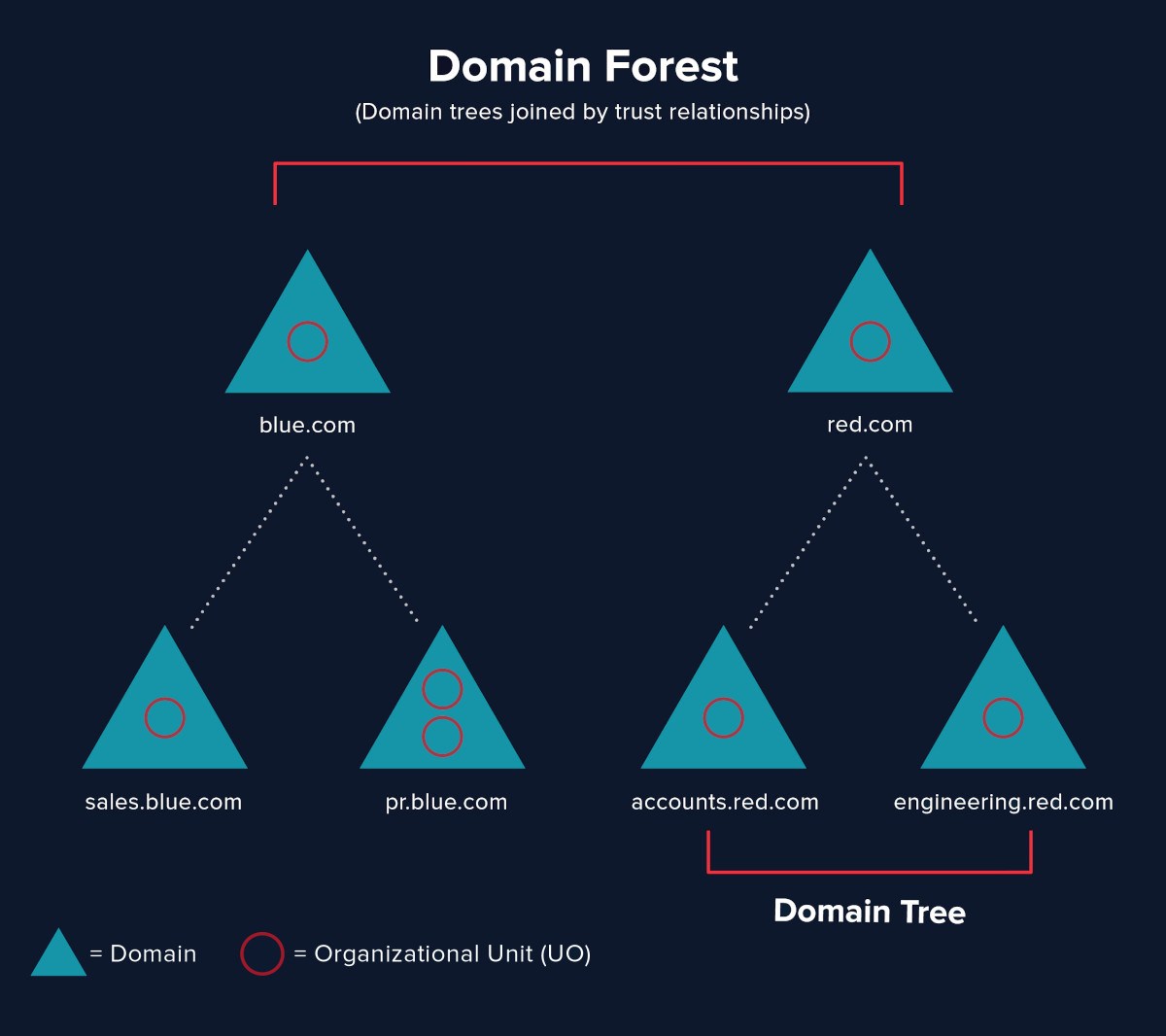 Relationship between Domains, Trees, and Forests in Active Directory
Users, Groups, and Computers
Understanding users, groups, and computers is vital in managing Active Directory effectively:
-
Users: Each user account represents an individual in the network. These accounts can have different roles and permissions based on their job functions. Proper management of user accounts is crucial for security and access control.
-
Groups: Groups simplify the management of permissions by bundling users into collections. This allows administrators to assign rights and access controls more efficiently, reducing administration overhead and improving consistency.
-
Computers: Each computer on the network can be associated with an account in Active Directory, which simplifies management and security settings. This allows for policies and configurations to be deployed systematically.
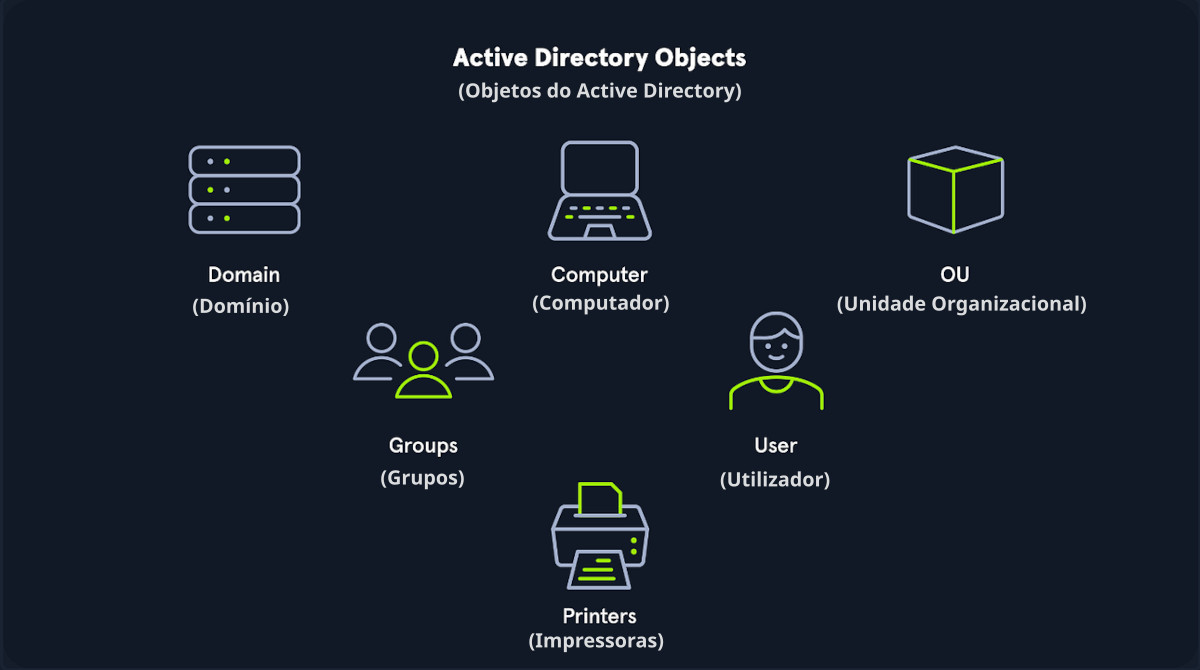 Overview of the components of Active Directory
Introduction to Active Directory Domain Services (AD DS)
Active Directory Domain Services (AD DS) is a core feature of Active Directory that provides the methods for storing directory information. AD DS plays a vital role in resource management tasks, authentication, and authorization processes.
Role of AD DS in Network Management
AD DS allows administrators to manage permissions and access to network resources efficiently. It centralizes security and access control, providing the backbone for user authentication and overall network security.
Basic Architecture
The architecture of AD DS consists of domain controllers (DCs) that store directory information. These DCs communicate with one another to ensure consistency and replication of data across the network. This replication is crucial for maintaining up-to-date directory information, enabling users to authenticate and access resources seamlessly. Many small networks opt for a single DC due to cost, management simplicity, and the scale of their needs. Having only one DC can pose risks, such as a single point of failure. If that server fails, authentication and access to resources may become unavailable.
Installation and Configuration Basics
Requirements for Installation
Before installing AD DS, various prerequisites should be in place, such as:
-
A compatible Windows Server operating system.
-
Properly configured network settings, including DNS.
-
Domain name and organizational information established prior to installation.
Simple Setup Walkthrough
- Install the Active Directory Domain Services role via the Server Manager.
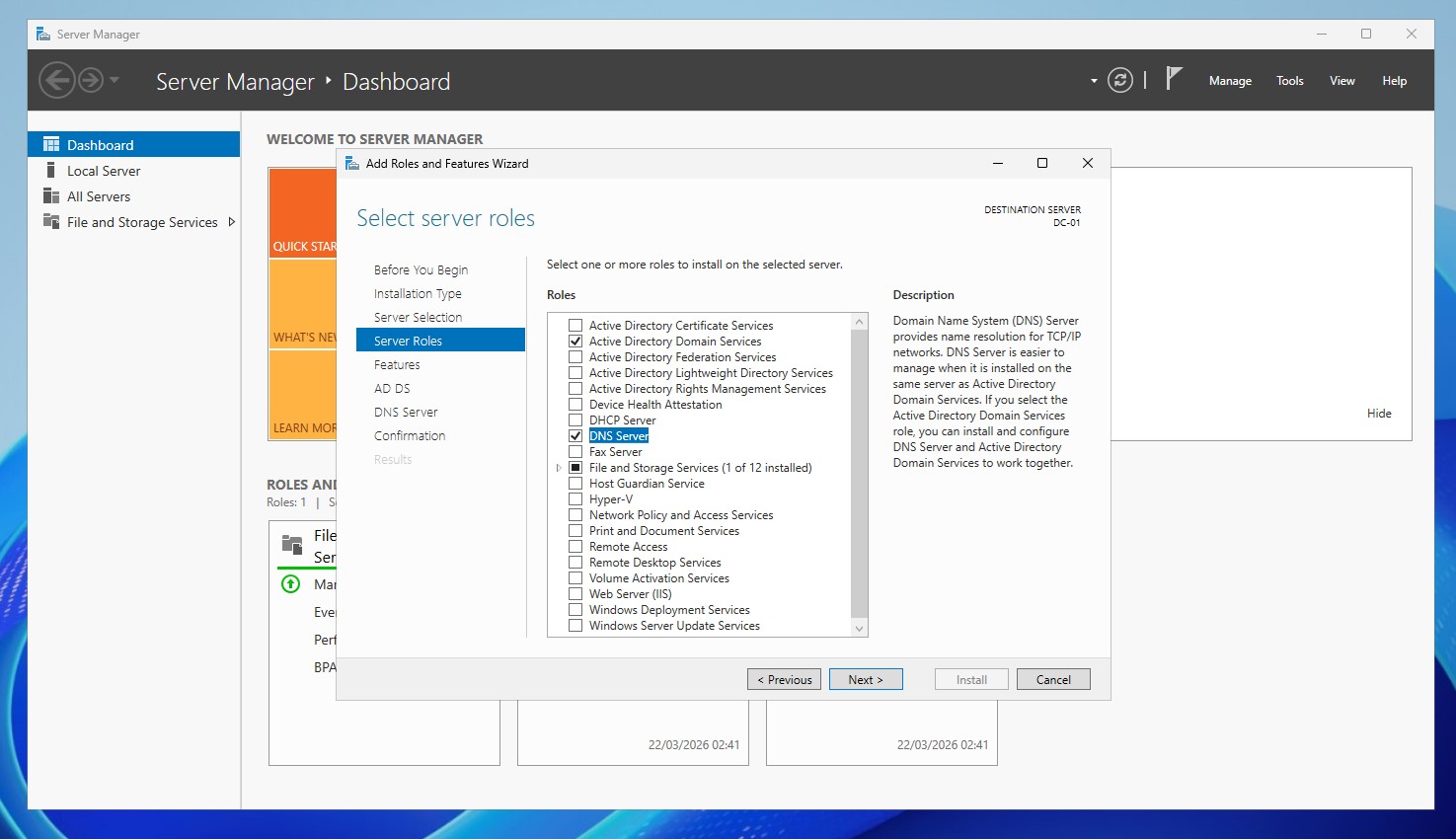 Adding role Active Directory Domain Services and DNS Server (Windows Server 2025)
- After installation, promote the server to a domain controller by following the configured wizard to set up your first domain or join an existing one.
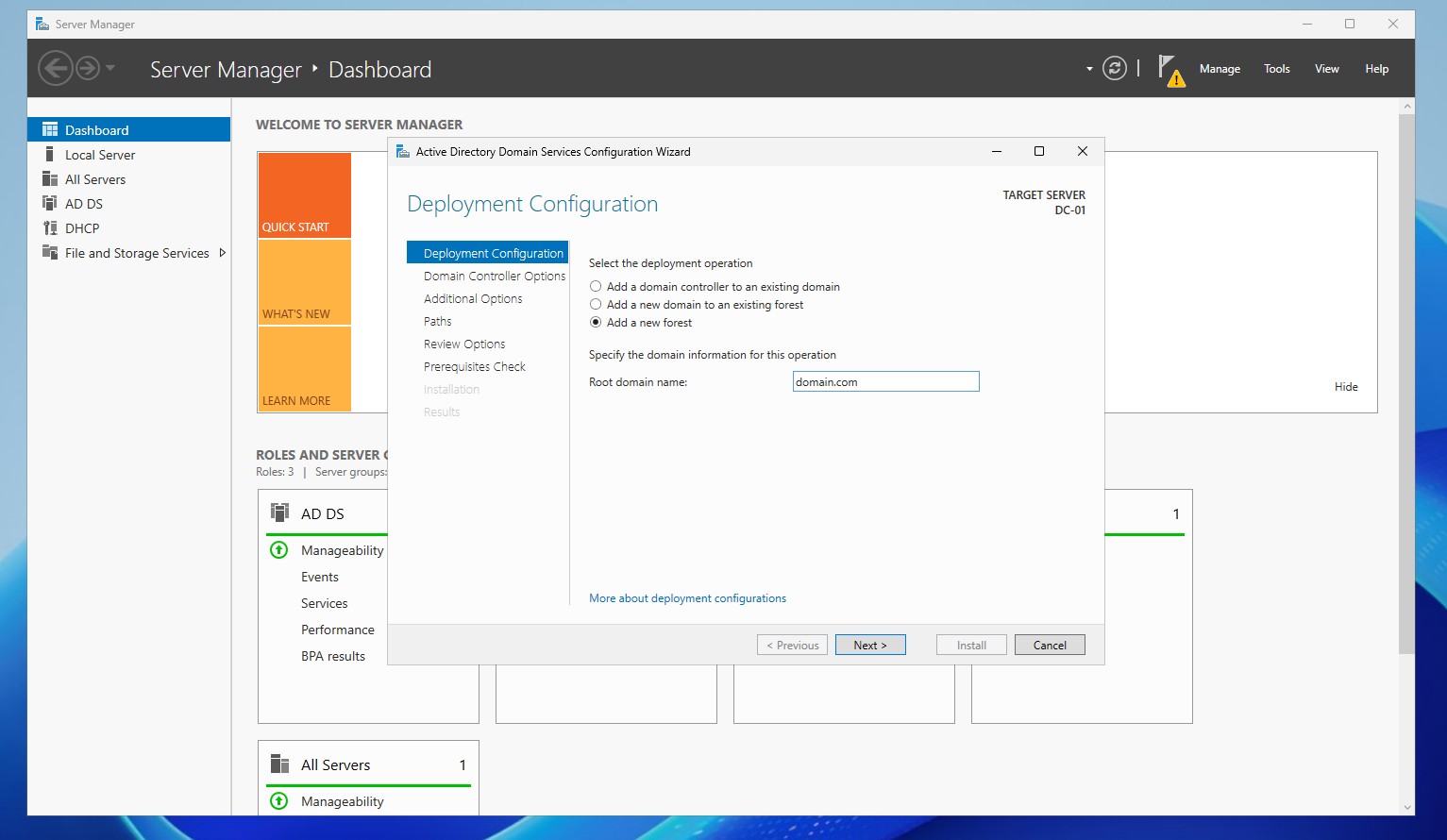 Promoting the server to a Domain Controller by creating a new forest (Windows Server 2025)
Joining Clients to the Domain
Now that we have a working Domain Controller available in the network we can start joining some client machines to the domain. On Windows 10/11 machines you can do this in the System Properties. Switch from Workgroup to Domain and type the domain name. You will be prompted for domain admin credentials.
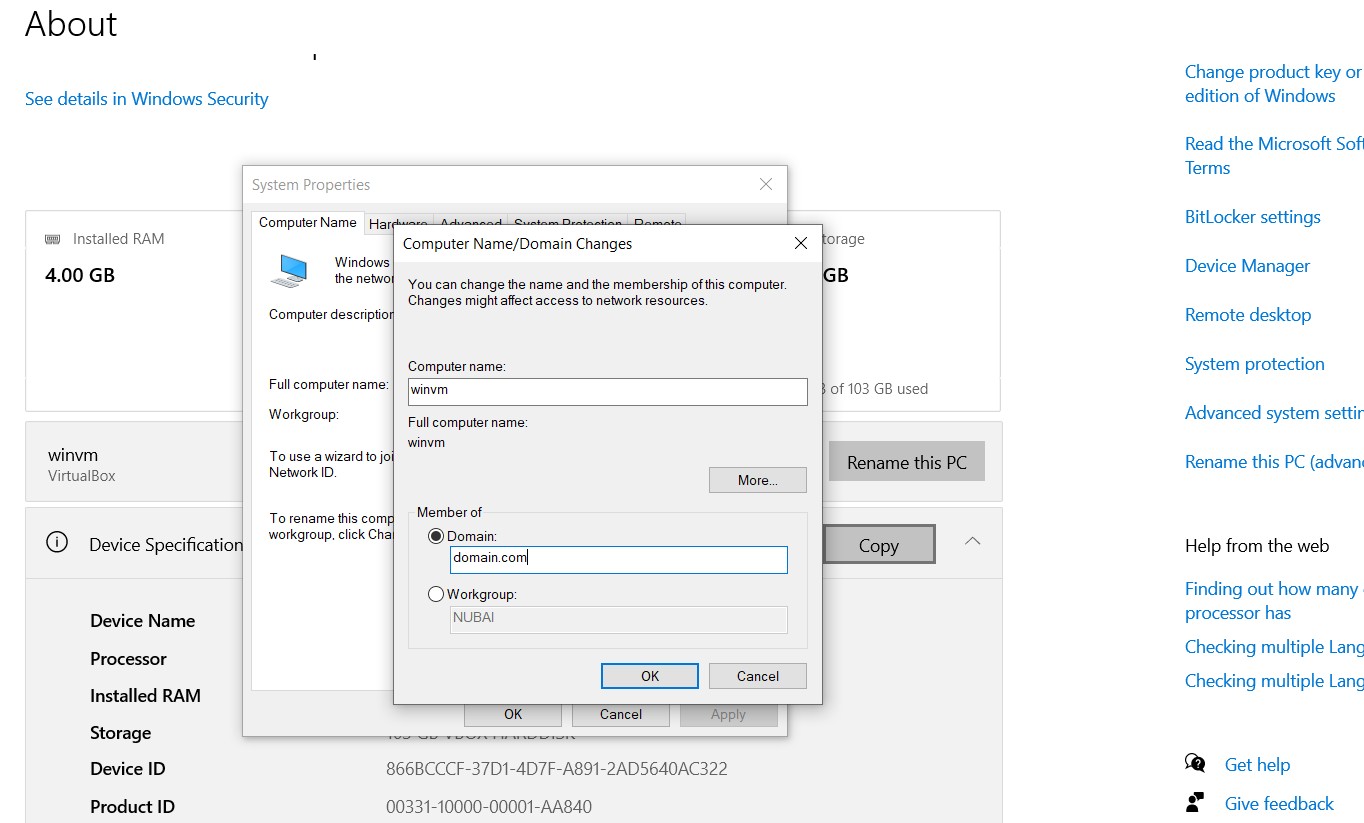 Joining a Windows 10 computer to the domain
While it is necessary to use a superuser account for joining clients to the domain, it is essential to limit the use of these credentials on client machines. Instead, it is advisable to delegate the necessary permissions to a non-admin user account. This reduces risk and adheres to the principle of least privilege.
Benefits of Delegating Control
By delegating the ability to join client machines to the domain to a standard user account, organizations can minimize security risks. This approach not only protects superuser credentials but also provides a more manageable structure for administrative tasks. Delegation allows specific users to perform necessary actions without granting them full administrative rights across the network.
Basic Administrative Tools
Active Directory Users and Computers (ADUC)
Active Directory Users and Computers (ADUC) is a primary management tool for interacting with AD. It allows administrators to create, modify, and delete users, groups, and organizational units. This interface simplifies day-to-day management tasks and enhances efficiency.
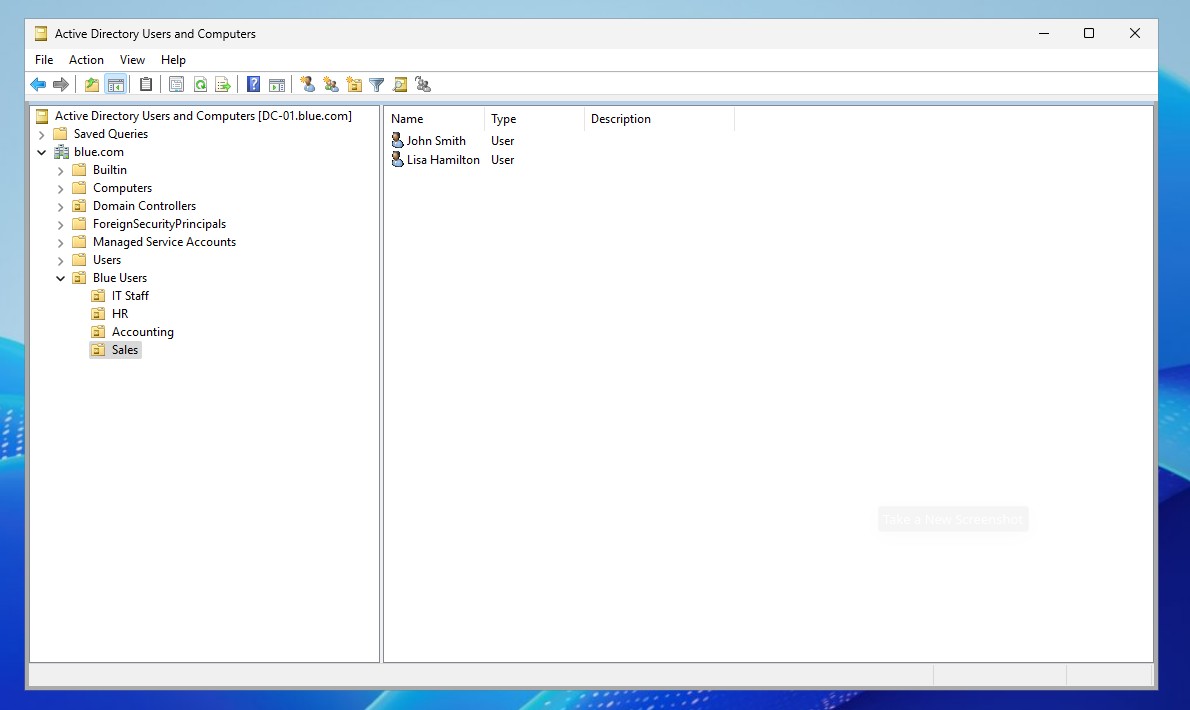 Active Directory Users and Computers
PowerShell for AD
PowerShell provides a powerful command-line interface for managing Active Directory. It allows for automation of repetitive tasks, bulk modifications, and advanced querying of directory information. This flexibility enables administrators to streamline their workflows and improve efficiency. It provides a rich set of cmdlets designed specifically for working with AD objects and performing complex administrative tasks.
Key Features of PowerShell for Active Directory Management
Cmdlets for AD Management
-
Get-ADUser: Retrieves user account details from AD.
-
Set-ADUser: Modifies user attributes, such as email or password.
-
Get-ADGroup: Lists information about groups within AD.
-
Add-ADGroupMember: Adds users to specified groups.
-
Remove-ADGroupMember: Removes users from groups.
Scripting Capabilities
-
Automation: Administrators can automate repetitive tasks by writing scripts that manage user accounts, groups, and other AD entities.
-
Batch Processing: PowerShell allows for executing commands on multiple objects at once, streamlining management tasks.
Integration with Other Tools
-
Active Directory Module: The Active Directory module for PowerShell includes comprehensive cmdlets that directly interact with AD services.
-
Integration with Other Cmdlets: PowerShell can combine commands from other modules, enabling complex workflows.
Reporting and Output
-
Reporting: Generate reports on user accounts, group memberships, and organizational units.
-
Formatted Output: Use PowerShell to format output as tables, lists, or export to various file types (e.g., CSV, JSON).
Remote Management
- PowerShell Remoting: Administrators can manage AD remotely from different locations, enhancing flexibility in managing environments.
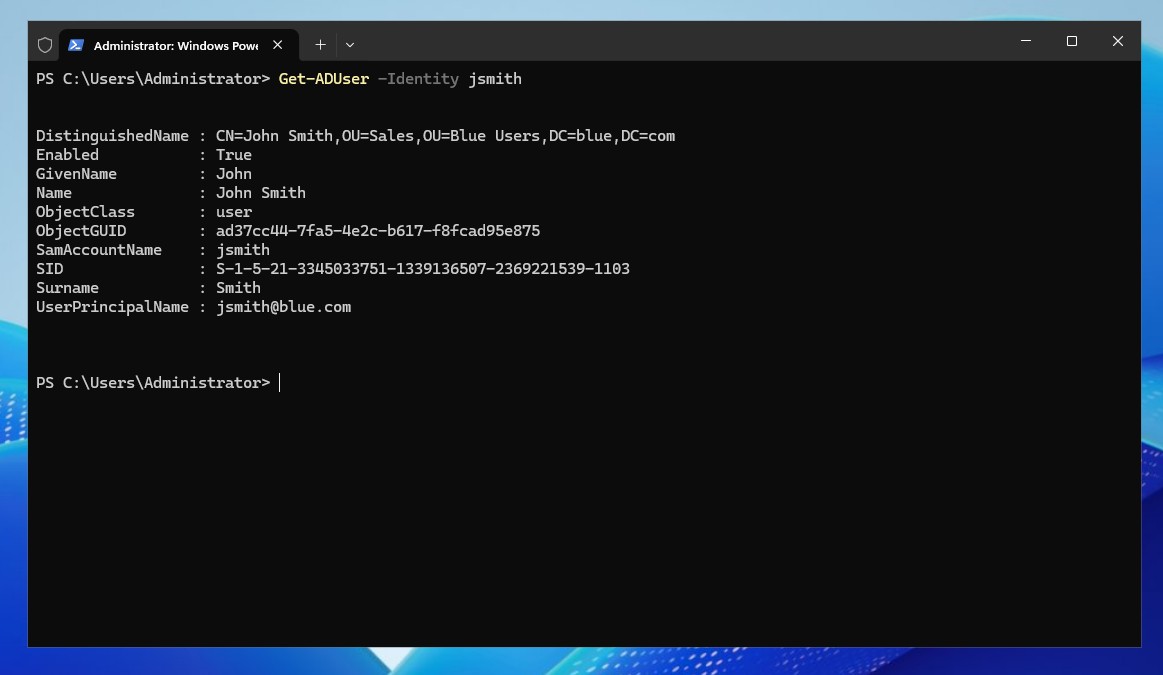 Retrieving information about certain domain user in Powershell
This article has laid the groundwork for understanding Active Directory and its core components. By grasping these foundational concepts, you will be better prepared to delve into more intermediate and advanced topics in Active Directory management in the subsequent parts of this series.